
X 333 Game APK | Latest Android Earning Game Download
Just Now
8MB
V1.21
Android 5+
34322

Description
Sometimes a new gaming app just catches your attention, not even for some big reason, but because you want something different to mess around with on your phone. You end up scrolling through online games, checking fresh platforms and maybe searching for an Android application that has other play modes. In Pakistan, you might bump into a title like X 333 Game during that kind of search.
Before installing it ,it helps to know a few basics first. Like, you should get a feeling for how the application is arranged, what kinds of games are actually listed, and where the account plus wallet screens are located. When you know these parts early, it feels less confusing, more like you’re settling in instead of trying to figure everything out immediately.
In this review, we dig a bit deeper into X 333 Game. We cover the Android installation process, the registration steps, the game categories, how to navigate toward the wallet, and what the payment information looks like. If you’re new here, or even just researching casually, this guide should point you toward the main areas worth exploring. Also checkout more similar games like 555VU and OXWIN Game.
What Is X 333 Game?
X 333 Game is kinda a name people associate with an online gaming platform. Android users, specially in Pakistan, might search for it, like in a quick way. The app seems made for people who want to try mobile gaming activities and also see account features that come along with it.
For new visitors, the easiest way to get what’s going on is to look at the main sections one by one, even if it’s a little messy at first. The home screen works as a starting point, while the game area lets users discover what kind of activities exist. Then there are account and wallet sections, those are good for figuring out profile info and transaction related options, you know things like balances or similar.
Don’t only decide based on the app name though, not really. It’s better to check the features that are available, and actually read the instructions shown inside the application.

A Quick Introduction to the App
| Information | Details |
|---|---|
| Name | X 333 Game |
| App format | APK |
| Platform | Android |
| Category | Online gaming |
| Intended audience | Mobile gaming users |
| Access | Application-based |
| Account features | Check options inside the app |
The available features and requirements should always be confirmed from the application itself, as they can vary between versions.
Start with the Main Screen
The first screen is where you begin getting familiar with X 333 Game. It can help you understand the general layout and identify the sections available to users.
Rather than immediately selecting a game, take a moment to look around. Notice the menu labels, available categories, and account-related icons. This small step can make navigation easier, particularly if you are using the application for the first time.
Here are some useful areas to look for:
- Main page: Your starting point for navigating the application.
- Games area: Where available gaming activities are displayed.
- Personal account: The section for profile and login-related information.
- Wallet: Where balance and transaction options may appear.
- Promotions: Check this area for any available offers and their conditions.
- Help: Look for assistance if you have questions about using the platform.
Learning where these sections are located gives you a better understanding of the application.
Exploring the Games Available
Different players enjoy different styles of mobile gaming. Some prefer card-based activities, while others like short games or reel-style entertainment. The game area is therefore an important place to explore.
Depending on the actual selection available inside X 333 Game, you may find categories such as:
Card Games
Card games are based on playing cards and specific rules. Each activity can have a different format, so it is worth reading the instructions before joining.
Slot Games
Slot-style games generally use reels, symbols, and combinations. Their features and rules can differ, making it important to understand the information displayed for each activity.
Mini Games
Mini games are designed around shorter activities. They can appeal to users who prefer exploring quick entertainment options on their phones.
Additional Gaming Options
The available lobby may contain other activities as well. Browse the categories to see what is actually offered instead of assuming that every platform has the same collection.
Features to Understand Before Getting Started
When exploring a new application, it helps to separate its features into practical groups. This makes it easier to understand what each section does.
| Area | What to explore |
|---|---|
| Game lobby | Available games and their instructions |
| Profile | Account information and settings |
| Wallet | Balance and transaction information |
| Promotions | Available offers and eligibility conditions |
| Payment section | Supported payment services |
| Help area | Account and application assistance |
These sections are worth checking before spending time on the platform. Clear information about account functions and transaction conditions is particularly important.
Download X 333 Game APK
If you want to install X 333 Game on an Android phone, start by finding its APK file from a source you trust. Since APK files can be downloaded outside the Play Store, checking the source is an important part of the process.
Use the following steps:
- Visit the website providing the X 333 Game APK.
- Find the download area for Android users.
- Check the application name carefully.
- Select the download option.
- Wait for the file to finish downloading.
- Open the Downloads folder on your phone.
- Locate the saved APK file.
Make sure the file is actually for X 333 Game. The spacing in the app name matters when you are searching for a separate application, so avoid selecting a similarly named file by mistake.
Installing the APK on Android
Once the file has downloaded, you can begin installation. The process is familiar to most Android users, although some phones display an additional permission prompt.
Follow these instructions:
- Open your phone’s File Manager.
- Go to the Downloads folder.
- Find the X 333 Game APK.
- Tap the file to open the installation screen.
- Review any permission request displayed by Android.
- Continue only if you trust the file source.
- Wait for installation to finish.
- Open the application.
If Android does not allow the installation, check the settings for permission to install applications from that particular source. Only enable this permission when appropriate, and disable it again afterward if you no longer need it.
Creating Your Profile
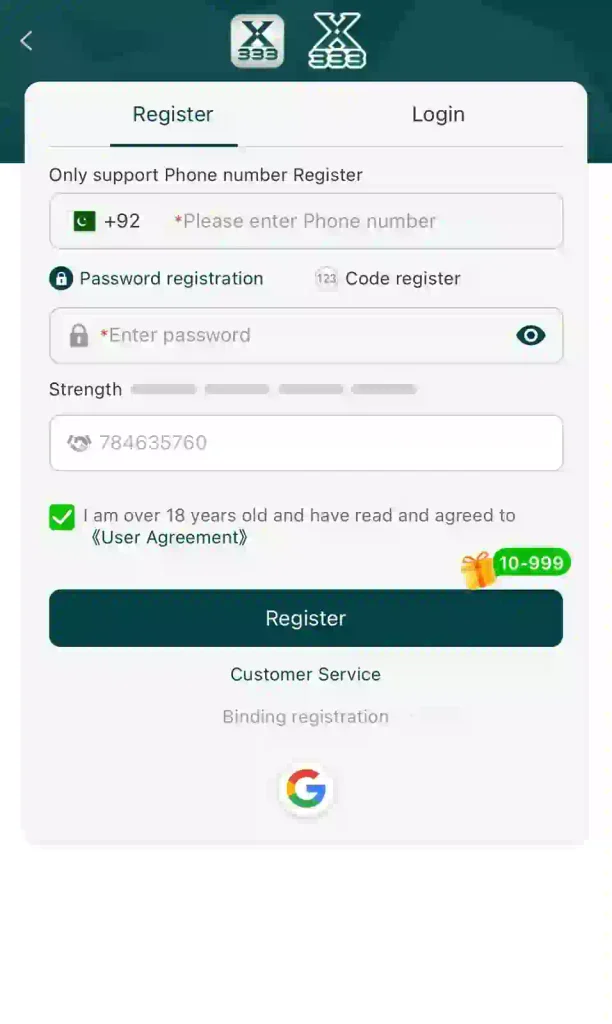
After launching the application, look for the registration option if you are a new user. The registration page should explain which details are needed to create an account.
The general steps may include:
- Opening the registration page.
- Entering the information requested in the form.
- Creating a password.
- Providing a referral code if you have one and the field is available.
- Reviewing your details.
- Completing any verification step shown on the screen.
Use your own information and choose a password that is difficult to guess. Avoid sharing login details or verification codes with other people.
Returning to X 333 Game
Once registration is complete, you can use the login option to access your account again.
Open the application, select the login section, and enter the details associated with your profile. If the application provides an account recovery option, you can check its instructions if you forget your password.
It is also worth visiting the profile area after signing in. Look through the available settings and make sure you understand how account information is displayed.
A few useful habits include:
- Keep your registered contact details accurate.
- Use a private password.
- Avoid unfamiliar login links.
- Do not share verification codes.
- Log out when using a shared device.
Understanding the Wallet and Its Options
The wallet is one of the sections that deserves a closer look, especially if the application includes account transactions.
Before using any wallet feature, understand what the displayed options mean. You may find areas related to balance information, deposits, withdrawals, and transaction records.
| Wallet section | Purpose |
|---|---|
| Balance | Shows the amount displayed in your account |
| Deposit | Provides instructions for adding funds, if supported |
| Withdrawal | Shows payout options, if available |
| History | Displays records of previous transactions |
| Payment details | Contains information needed for supported methods |
Read the instructions carefully before using these options. Understanding the process first can help you avoid entering incorrect information.
Payment Options for Users in Pakistan
Pakistani users often look for familiar digital payment services when exploring online platforms. Easypaisa, JazzCash, and bank transfers are commonly searched payment options.
However, the services supported by a platform can differ. Open the payment section of your X 333 Game account to confirm which methods are actually available.
Before making a transaction, follow these basic checks:
- Select a method displayed inside the application.
- Read its payment instructions.
- Confirm the recipient information.
- Check the amount before sending.
- Keep the transaction reference or receipt.
Never rely on payment details sent through an unrelated message. Use the information provided through the platform’s own payment instructions.
How to Withdraw from X 333 Game
If the application offers withdrawals, you can find the relevant instructions in its wallet or payment section. The process should explain which details are required and which methods are supported.
A general withdrawal procedure may involve:
- Signing in to your account.
- Opening the wallet section.
- Selecting the withdrawal option.
- Choosing an available payment method.
- Entering the requested details.
- Reviewing the information before submitting.
- Saving the transaction reference.
Always read the displayed conditions before submitting a request. If you need an update, check the transaction history or use the support option provided by the platform.
Promotions and Referral Information
Promotional activities are another area users may want to explore. If X 333 Game provides rewards, bonuses, or referral options, check the relevant section to understand how they work.
Do not focus only on the headline of an offer. Read its terms, eligibility rules, and any requirements attached to it.
If a referral code or invitation link is available, understand the program before sharing it. Avoid making promises about rewards to other people because promotional conditions can apply.
Make Your Android Experience More Comfortable
A smooth experience also depends on your phone and internet connection. A few everyday habits can make using an application more convenient.
Choose a reliable connection: A stable internet connection can help reduce interruptions.
Keep your device updated: Android updates can improve general performance and compatibility.
Manage storage space: Keep enough free storage for normal phone activity.
Close unnecessary apps: This may help if your device has limited memory.
Read game instructions: Every activity can have different rules, so understand them before playing.
Protect your phone: Use a screen lock and avoid installing files from unfamiliar sources.
These tips are useful for general Android gaming and can help you keep your device organized.
What Should First-Time Users Pay Attention To?
If you are new to X 333 Game, there is no need to explore every section immediately. Start with the basic information and gradually become familiar with the application.
Here is a practical checklist:
✓ Confirm the app name before installing the APK.
✓ Explore the main screen and available game categories.
✓ Read the rules of each activity.
✓ Understand the registration and login process.
✓ Review wallet and payment instructions.
✓ Check the conditions of any promotional offer.
✓ Find the support section for account-related questions.
Following this order makes it easier to understand the platform without overlooking important details.
My Review: Getting to Know X 333 Game
A useful review should look at the experience from the perspective of someone who is discovering an application for the first time. For X 333 Game, the areas worth examining are its gaming selection, navigation, account setup, and wallet information.
The game lobby helps users understand which activities are available. The profile area is important for managing account details, while the wallet explains the transaction options provided by the platform.
My recommendation for anyone exploring this application is to take a little time with these sections before making decisions. Read the rules, understand the account features, and check payment conditions carefully.
That approach gives you a more realistic understanding of the platform than relying on promotional claims alone.
Keep Entertainment Within a Healthy Balance
Online gaming should be treated as entertainment, not as a dependable way to earn money. Game results and promotional rewards are not guaranteed.
Set a personal time and spending limit before using paid features. Avoid chasing losses, and never use money reserved for important household or personal expenses. Taking breaks is also a good habit.
A balanced approach helps keep gaming enjoyable without allowing it to interfere with everyday responsibilities.
Final Thoughts on X 333 Game
X 333 Game is a name that Android users in Pakistan might run into while casually browsing online gaming platforms, and honestly it can feel a bit confusing at first. Before you jump in and start, the most useful things to know are the kinds of games available, how the account area works, what wallet options you have, and which payment methods are actually supported.
First, take a moment to explore the application itself, don’t rush straight into the features. Look through the game instructions, figure out how account management is handled, then read the terms tied to transactions and promotions. That part matters, even if it feels like a lot at the beginning.
A bit of preparation can make the whole platform more clear and it helps you decide if it matches what you like, or if it’s not really your vibe. Keep your account secure, make smarter decisions, and enjoy mobile gaming responsibly, without overdoing it.
Frequently Asked Questions
What is the X 333 Game APK?
X 333 Game APK refers to the Android installation package associated with the X 333 Game platform.
How can I find the correct X 333 Game application?
Check the complete application name and download source before installing. This is particularly important when searching for similarly named games.
What should I do after installing X 333 Game?
Open the application, explore its main sections, and follow the registration instructions if you need to create an account.
Where can I find information about deposits and withdrawals?
Check the wallet or payment section. It should display the transaction options and instructions supported by the platform.
Can X 333 Game guarantee regular earnings?
No. Gaming outcomes and promotional rewards are not guaranteed. Treat online gaming as entertainment rather than a regular income source.
Download links
How to install X 333 Game APK | Latest Android Earning Game Download APK?
1. Tap the downloaded X 333 Game APK | Latest Android Earning Game Download APK file.
2. Touch install.
3. Follow the steps on the screen.